
multinel’s Professional Services
CCTV Maintenance
CCTV Maintenance
1. Preventive Maintenance (Proactive Upkeep)
The primary goal of preventive maintenance is to inspect and service the equipment at scheduled intervals to prevent hardware failure, minimize downtime, and extend the lifespan of the system.
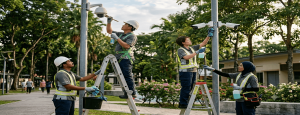
Camera & Hardware Tasks:
- Lens Cleaning: Wiping down camera lenses, bubbles, and outer housings with anti-static solution to remove dust, cobwebs, and water spots.
- Focus & Alignment: Checking and adjusting the camera’s field of view (FOV) and focus parameters to ensure optimal coverage.
- Physical Security: Tightening camera mounting brackets, conduits, and junction boxes to prevent camera shake or vandalism.
- Housing Seals: Inspecting outdoor camera enclosures and weatherproof gaskets for signs of moisture, cracking, or water ingress.
Wiring & Infrastructure Tasks:
- Cable Inspection: Checking exposed coaxial (RG59) or Ethernet (Cat6) cables for fraying, rodent damage, or sun/UV degradation.
- Connection Integrity: Checking and re-tightening BNC connectors, RJ45 jacks, and power terminal blocks to eliminate video signal loss or flickering.
Control & Recording Unit Tasks:
- Dust Clearing: Opening and vacuuming/blowing out dust from NVR/DVR internal cooling fans and power supply units (PSUs) to prevent overheating.
- Power & Backup Testing: Testing the Uninterruptible Power Supply (UPS) battery backup to ensure the system stays online during power cuts.
- Monitor Calibration: Checking control room monitors for screen burn-in, contrast, and color accuracy.
2. Corrective Maintenance (Reactive Repair)
Corrective maintenance is performed on-demand when a fault, failure, or performance drop has been detected. It focuses on isolating the root cause and restoring the system to full operation.
Diagnostic & Troubleshooting Tasks:
- Signal Tracing: Using a CCTV tester or network analyzer to trace packet loss, video ground loops, or voltage drops down a specific cable run.
- Log Analysis: Reviewing NVR/DVR error logs to identify hard drive failure warnings, IP address conflicts, or sudden power drops.
Component Replacement Tasks:
- Hardware Swapping: Replacing dead image sensors (CMOS), burnt-out infrared (IR) illuminator boards, or faulty power supplies on-site.
- Storage Remediation: Replacing failed hard drives in a RAID array and initiating the rebuild process without losing historical data.
- Re-Terminating Endpoints: Cutting back corroded copper wiring and crimping new, high-quality connectors to restore lost signals.
3. Predictive & Software Maintenance (Digital Optimization)
Predictive maintenance uses system data and analytics to predict when a component might fail so it can be serviced just before breakdown. It also involves optimizing the software and network layers of modern IP-based security systems.
Data & Storage Monitoring:
- HDD Health Checks: Monitoring Self-Monitoring, Analysis, and Reporting Technology (S.M.A.R.T.) data on hard drives to predict mechanical disk failures before they crash.
- Frame-Rate & Bitrate Optimization: Analyzing network bandwidth consumption to adjust video compression settings (e.g., H.264 vs. H.265) and optimize storage retention days.
Software & Cybersecurity Tasks:
- Firmware Updates: Flashing the latest manufacturer firmware onto IP cameras and recorders to patch cybersecurity vulnerabilities and resolve software bugs.
- Database Management: Optimizing the indexing database of the Video Management Software (VMS) to ensure fast video playback and search retrieval.
- Time Synchronization: Ensuring all cameras and recorders are synced accurately via a Network Time Protocol (NTP) server so video timestamps are legally admissible in court.
Card Access Maintenance
Access Control System (ACS)
is a security solution that regulates who or what can view, enter, or use resources in a given environment. It consists of physical components (like locks and gates) and digital components (like software and credentials).
Here is a detailed breakdown of the different types of access control systems and their essential maintenance services.
Types of Access Control Systems
Access control systems can be categorized either by how they grant access (Logical/Software Models) or by how they are physically deployed (Physical/Infrastructure Types).
1. By Access Control Models (Logical/Software)
These models define the rules and policies used to determine who gets access to specific areas or data.
- Discretionary Access Control (DAC)
- Definition: The owner of the business or data decides who is allowed access.
- How it works: Permissions are highly customizable. The administrator can grant read, write, or execute permissions to specific individuals.
- Pros/Cons: It is highly flexible but the least secure, as it relies on human judgment.
- Mandatory Access Control (MAC)
- Definition: A centralized authority classifies users and resources based on security levels (e.g., Confidential, Secret, Top Secret).
- How it works: Users can only access information or areas that match or are below their specific clearance level.
- Pros/Cons: Extremely secure; commonly used in military and government facilities, but highly rigid.
- Role-Based Access Control (RBAC)
- Definition: Access is granted based on the user’s specific job title or role within the organization.
- How it works: Instead of assigning permissions to an individual, permissions are assigned to a “Role” (e.g., HR, Finance Manager, IT Support). When an employee joins a department, they inherit that role’s permissions.
- Pros/Cons: The most popular choice for corporations because it simplifies user management.
- Rule-Based Access Control (RuBAC)
- Definition: Access is granted or denied based on a set of predefined environmental rules or conditions.
- How it works: Permissions might only apply during specific hours (e.g., 9 AM to 5 PM) or from specific physical locations (e.g., inside the office building network).
2. By Physical & Deployment Infrastructure
These describe the actual hardware and software architecture used to secure physical doors and gates.
- Standalone Systems
- Description: Localized control systems for a single door or a small number of doors.
- Mechanism: All data, user codes, and access rights are stored directly on the lock or a small local controller next to the door.
- Best for: Small retail shops, private offices, or storage closets.
- Networked / IP-Based Access Control
- Description: Multiple doors are connected back to a central server via an Ethernet or Wi-Fi network.
- Mechanism: Administrators can manage permissions, track entry logs, and lock down the entire building in real-time from a central computer dashboard.
- Best for: Medium to large enterprises, campuses, and multi-story buildings.
- Cloud-Based Access Control (ACaaS)
- Description: Access Control as a Service (ACaaS) hosts the management software in the cloud rather than on an on-premise local server.
- Mechanism: Credentials can include smartphone apps (Bluetooth/NFC). IT managers can grant or revoke access remotely from anywhere in the world via a web browser.
- Best for: Modern businesses, remote-first companies, and multi-location franchises.
Access Control Maintenance Services
To ensure continuous security, minimize downtime, and prevent physical lockouts, regular maintenance is required. This is typically split into preventative and corrective maintenance.
1. Hardware Maintenance
- Reader Inspection: Cleaning and testing proximity card readers, biometric scanners (fingerprint/facial recognition), and keypads to ensure fast read times.
- Locking Mechanisms: Inspecting and lubricating magnetic locks (maglocks), electric strikes, and motorized deadbolts to ensure smooth physical engagement.
- Door Hardware Check: Testing door closers, hinges, and alignment. If a door doesn’t close fully, the access control system cannot secure it.
- Backup Power Testing: Inspecting and testing Uninterruptible Power Supplies (UPS) and backup batteries to ensure the system functions during power outages.
2. Software & Database Maintenance
- Firmware & Software Updates: Applying patches to controllers and management software to protect against cybersecurity vulnerabilities.
- Database Cleanup: Auditing the user list to delete expired credentials, deactivated employee badges, and temporary guest passes.
- Log Backups: Backing up and archiving event logs (who entered where and when) for compliance and forensic audit purposes.
- Time Synchronization: Ensuring all door controllers are synced to the correct network time so that time-based rules operate correctly.
3. System Testing & Integration
- Emergency Fire Alarm Integration: Testing the critical fail-safe feature where the access control system must automatically unlock all emergency exit doors if the fire alarm triggers.
- Tamper Alarm Testing: Simulating a “forced door” or “door held open too long” event to verify that alarms and notifications reach security personnel.
- CCTV Integration Check: Ensuring that when a door card is swiped, the corresponding security camera successfully tags and records the footage of the event.
Card Access and CCTV Systems Network Maintenance
When CCTV cameras and Access Control Systems (ACS) move from standalone setups to IP-based networks, they become entirely dependent on network health. If the network goes down, video streams drop, and doors may fail to communicate with the central server.
Network maintenance services focus specifically on the data pipelines, switches, routers, and configurations that keep these security systems talking to each other.
1. Network Infrastructure Maintenance (Hardware & Physical Layer)
- Network Switch Auditing: Inspecting, cleaning, and testing managed switches (like the LevelOne GEP/GEL series) to ensure they are forwarding data efficiently without packet loss.
- PoE (Power over Ethernet) Management: Checking PoE power budgets on switches to guarantee that power-heavy devices (like infrared IP cameras or magnetic door locks) receive stable wattage.
- Cable and Port Testing: Testing RJ45 terminations, patch panels, and copper/fiber cabling using network analyzers to identify degradation, crosstalk, or physical damage.
- SFP and Uplink Monitoring: Verifying that fiber optic transceivers (SFP modules) and core uplink ports are clear of errors and operating at full speed (e.g., 1Gbps or 10Gbps) to handle high-bandwidth video traffic.
2. Logical Network & Traffic Optimization
- VLAN Configuration and Isolation: Reviewing and maintaining Virtual Local Area Networks (VLANs) to keep security traffic segregated from standard corporate data, improving both performance and security.
- QoS (Quality of Service) Tuning: Configuring and updating QoS rules on routers and switches to prioritize real-time IP video streams and access control signaling over less critical network traffic.
- Bandwidth and Throughput Analysis: Monitoring continuous data loads to prevent network bottlenecks, especially when high-definition 4K cameras or multi-door controllers stream data simultaneously.
- IP Address Management (IPAM): Managing the IP address pool, ensuring that static IP assignments for cameras and door controllers do not conflict with DHCP pools used by general office devices.
3. Network Cybersecurity & Firmware Lifecycle
- Switch and Router Firmware Patching: Regularly updating the operating software of network switches, firewalls, and edge devices to patch known security vulnerabilities.
- Port Security Enforcement: Disabling unused physical switch ports and implementing MAC address filtering to prevent unauthorized laptops or rogue devices from plugging directly into the security network.
- Credential & Encryption Auditing: Changing default passwords on network hardware, managing SSH/HTTPS access keys, and ensuring that video streams (RTSP) and access logs use encrypted network protocols.
- Firewall and VPN Rule Reviews: Auditing firewall access control lists (ACLs) and Secure VPN tunnels used by remote security guards or cloud-based hosting providers to ensure no unauthorized backdoors exist.
4. Continuity, Monitoring & Backup Services
- Switch Configuration Backups: Keeping up-to-date configuration file backups for all managed switches and routers so a failed device can be replaced and provisioned in minutes.
- SNMP Monitoring Setup: Configuring Simple Network Management Protocol (SNMP) alerts to automatically notify IT/Security teams the second a switch goes offline, a port drops, or an IP camera stops responding.
- Network Redundancy Testing: Simulating network failures to test if failover protocols (like Spanning Tree Protocol – STP or ring topologies) successfully reroute data through backup links without dropping the live video feed.
Public Address System Maintenance
This detailed maintenance write-up is designed for a Yearly Preventative Maintenance (YPM) program for building Public Address (PA) systems. It is structured to ensure regulatory compliance, equipment longevity, and operational readiness.
Annual Public Address System Maintenance Protocol
1. Objective
The goal of this annual maintenance is to ensure the absolute reliability of the PA system for paging, background music, and emergency evacuation announcements. This protocol covers the four critical pillars: Speakers, Wiring, Amplifiers, and Media Players.
2. Comprehensive Maintenance Procedures
A. PA Speakers (Acoustic & Structural Integrity)
- Visual Inspection: Check for physical damage, rust, or loose mounting hardware in all ceiling, wall-mounted, or horn speakers.
- Acoustic Testing: Perform a sweep test across the frequency range to identify blown drivers, rattling components, or distorted sound quality.
- Volume Calibration: Ensure uniform sound pressure levels (SPL) across all zones, adjusting as necessary to account for changes in room acoustics or furniture layout.
B. Wiring & Cabling (Signal Path Integrity)
- Termination Check: Inspect all junction boxes and connection points for oxidation, loose terminal screws, or frayed wires.
- Continuity & Insulation Testing: Conduct impedance and insulation resistance testing to detect hidden cable degradation or short circuits that could cause system failure during high-load periods.
- Labeling Update: Verify that all cable tags and zone labels are accurate, readable, and match the current system schematic.
C. Amplification Units (Power & Thermal Management)
- Thermal Maintenance: Clean all ventilation paths, intake fans, and heatsinks to prevent overheating—a leading cause of amplifier failure.
- Performance Diagnostics: Measure output voltage and signal-to-noise ratios to ensure the amplifiers are delivering clean, consistent power to all zones.
- Load Testing: Verify that amplifiers can handle maximum capacity without clipping or entering protection mode.
D. Media Players & Control Hardware (System Interface)
- Software & Firmware: Update all media player firmware to the latest stable versions to fix bugs and improve file compatibility.
- Connectivity Verification: Test all inputs (microphones, streaming sources, auxiliary lines) for noise-free signal paths.
- Battery Backup Testing: If the system includes a UPS or emergency battery supply, test the discharge rate and capacity to ensure the system remains operational during a power failure.
3. Reporting and Documentation
Following the physical inspection, a formal report will be generated including:
- System Health Score: An overall summary of the system’s performance.
- Defect Log: A detailed list of any components requiring immediate repair or future replacement.
- Certification: A sign-off document verifying that the system meets safety and operational standards.
4. Why Yearly Maintenance is Essential
- Emergency Preparedness: A regularly tested PA system is the most critical tool for building evacuation and safety alerts.
- Cost Efficiency: Identifying a failing component during a yearly check prevents costly emergency service calls and unplanned downtime.
- Extended Lifespan: Regular cleaning and calibration keep internal components running within manufacturer specifications for much longer.
Would you like me to adapt this into a formal checklist template for your technicians to use during their site visits?


